ЖИ көмекші


 Қауіпсіз төлем




1 жыл бойы шексіз жүктеңіз
Презентация урок


#1 слайд
Welcome to the
lesson
1 слайд
Welcome to the lesson
#2 слайд
Demo lesson:
Conditional Statements and
Logical operators
Оператор выбора
Таңдау операторы
2 слайд
Demo lesson: Conditional Statements and Logical operators Оператор выбора Таңдау операторы
#3 слайд
YOU WILL:
×
identify comparison operators;
×
apply if/else statements;
×
learn and apply Logical operators (AND,OR, NOT);
×
8.3.3.1 - таңдау және қайталау операторларын
программаны өңдеудің кіріктірілген
ортасыныңда қолдану;
×
8.3.3.1 использовать операторы выбора и
циклов в интегрированной среде разработки
программ (С/С++, Python, Delphi, Lazarus)
3 слайд
YOU WILL: × identify comparison operators; × apply if/else statements; × learn and apply Logical operators (AND,OR, NOT); × 8.3.3.1 - таңдау және қайталау операторларын программаны өңдеудің кіріктірілген ортасыныңда қолдану; × 8.3.3.1 использовать операторы выбора и циклов в интегрированной среде разработки программ (С/С++, Python, Delphi, Lazarus)
#4 слайд
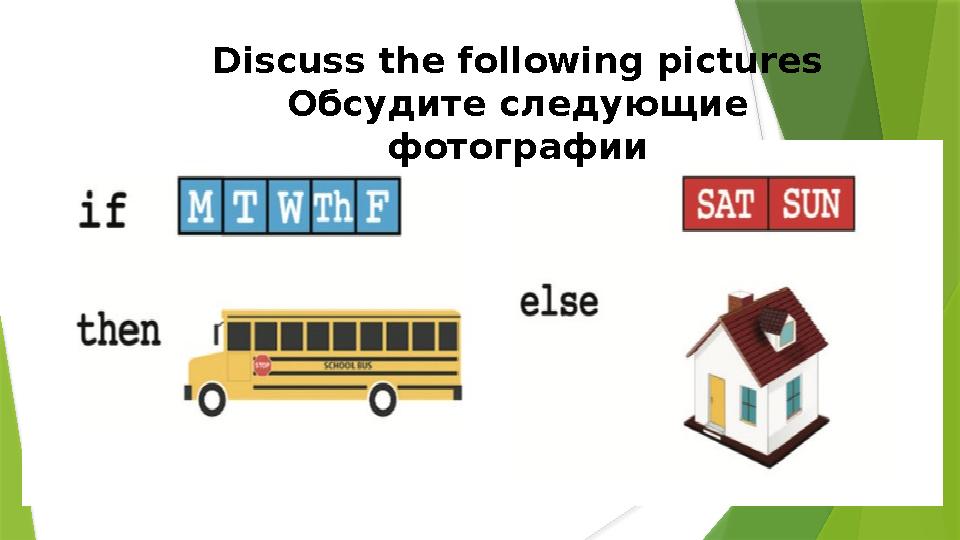
If / else statement
If / else statement is a decision
between two things .
For example, if it is a weekday it is
time to go to school. Otherwise,
you can stay home.
We use ‘if’ statement for making
only one decision.
4 слайд
If / else statement If / else statement is a decision between two things . For example, if it is a weekday it is time to go to school. Otherwise, you can stay home. We use ‘if’ statement for making only one decision.
#5 слайд
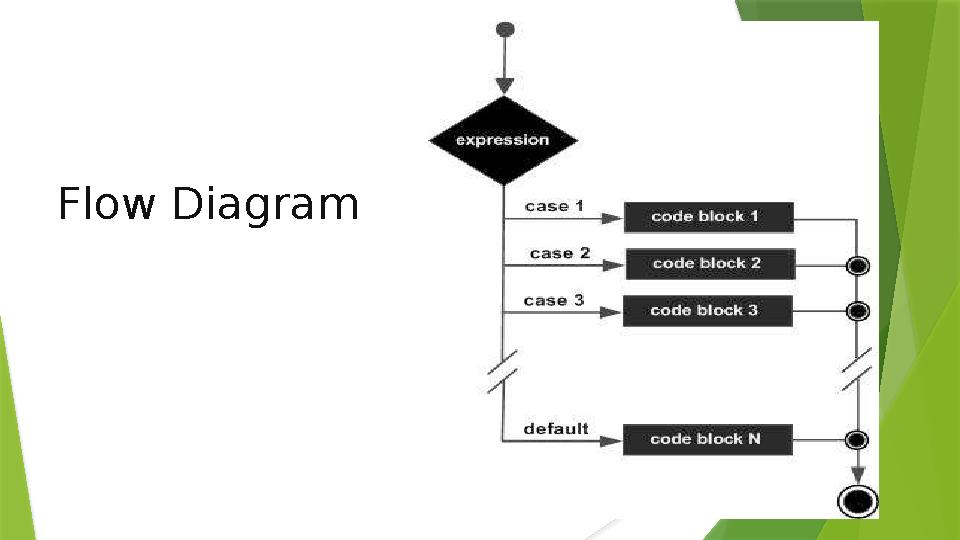
Switch
Switch case statements are a substitute for
long if statements that compare a variable
to several integral values.
●
The switch statement is a multiway branch
statement. It provides an easy way to dispatch
execution to different parts of code based on the
value of the expression.
●
Switch is a control statement that allows a value to
change control of execution.
5 слайд
Switch Switch case statements are a substitute for long if statements that compare a variable to several integral values. ● The switch statement is a multiway branch statement. It provides an easy way to dispatch execution to different parts of code based on the value of the expression. ● Switch is a control statement that allows a value to change control of execution.
#6 слайд
Flow Diagram
6 слайд
Flow Diagram
#7 слайд
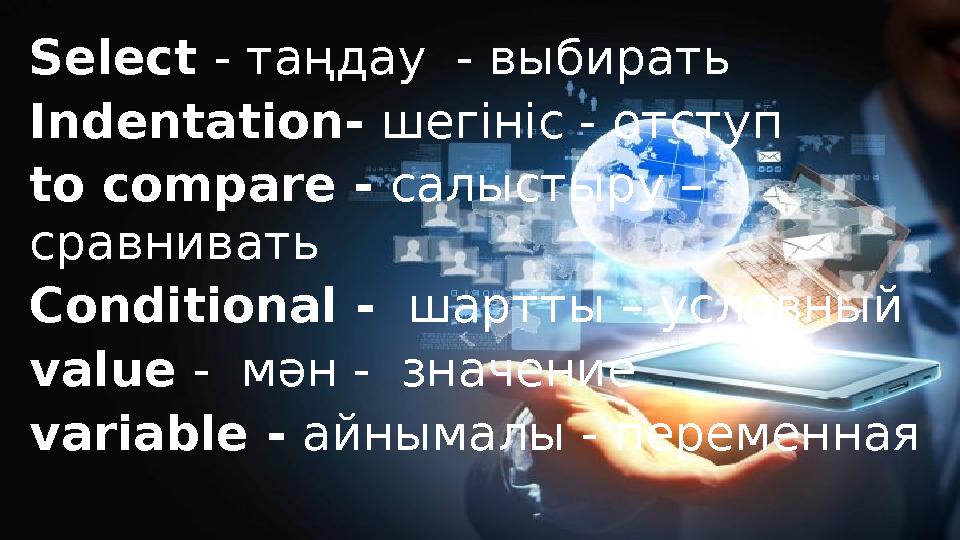
Select - таңдау - выбирать
Indentation - шегініс - отступ
to compare - салыстыру –
сравнивать
C onditional - шартты – условны й
value - мән - значение
variable - айнымалы - переменная
7 слайд
Select - таңдау - выбирать Indentation - шегініс - отступ to compare - салыстыру – сравнивать C onditional - шартты – условны й value - мән - значение variable - айнымалы - переменная

#8 слайд
W
A
T
C
H
I N
G
V
I D
E
O
8 слайд
W A T C H I N G V I D E O
#9 слайд
Discuss the following pictures
Обсудите следующие
фотографии
9 слайд
Discuss the following pictures Обсудите следующие фотографии
#10 слайд
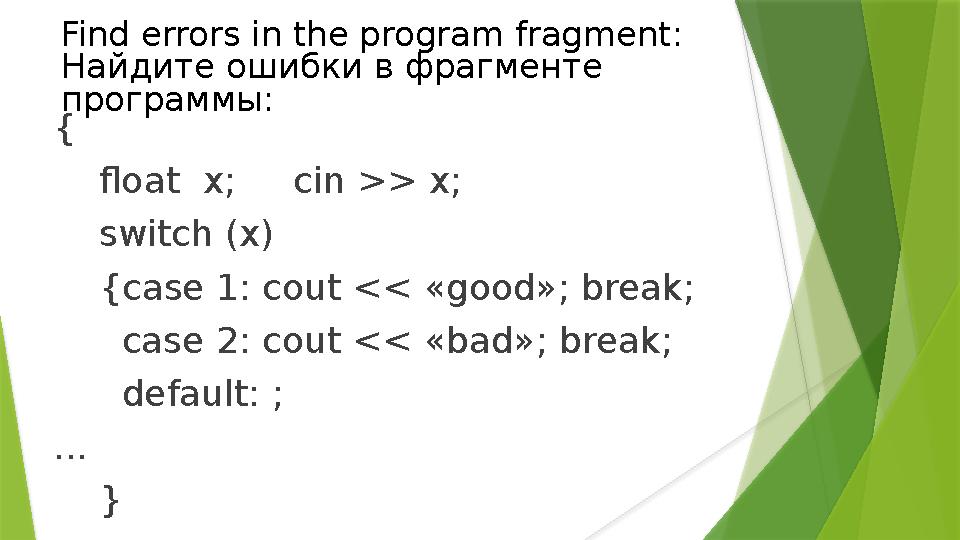
Find errors in the program fragment:
Найдите ошибки в фрагменте
программы:
{
float x; cin >> x;
switch (x)
{case 1: cout << «good»; break;
case 2: cout << «bad»; break;
default: ;
...
}
10 слайд
Find errors in the program fragment: Найдите ошибки в фрагменте программы: { float x; cin >> x; switch (x) {case 1: cout << «good»; break; case 2: cout << «bad»; break; default: ; ... }
#11 слайд
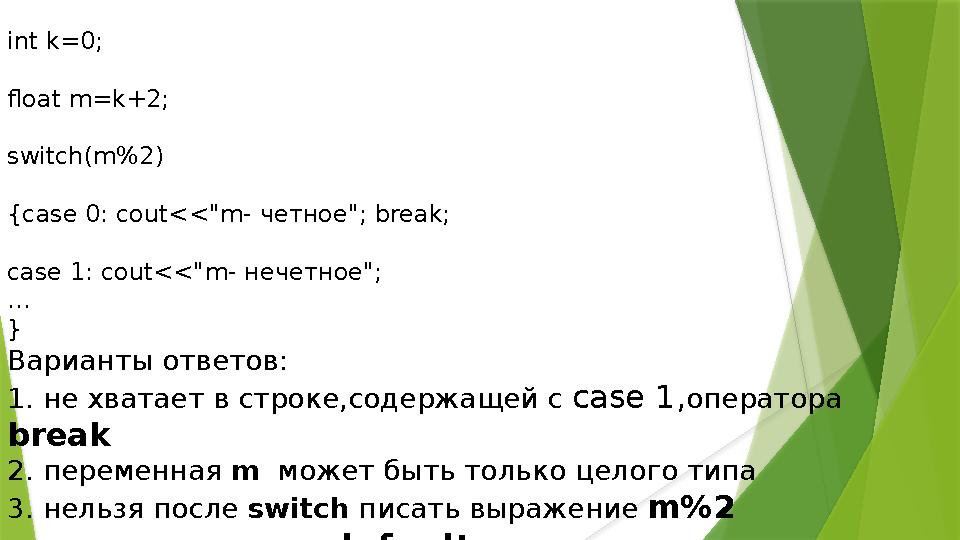
int k=0;
float m=k+2;
switch(m%2)
{case 0: cout<<"m- четное"; break;
case 1: cout<<"m- нечетное";
…
}
Варианты ответов:
1. не хватает в строке,содержащей с case 1, оператора
break
2 . переменная m может быть только целого типа
3. нельзя после switch писать выражение m%2
4 . отсутствует ветвь default
11 слайд
int k=0; float m=k+2; switch(m%2) {case 0: cout<<"m- четное"; break; case 1: cout<<"m- нечетное"; … } Варианты ответов: 1. не хватает в строке,содержащей с case 1, оператора break 2 . переменная m может быть только целого типа 3. нельзя после switch писать выражение m%2 4 . отсутствует ветвь default
#12 слайд
Questions
1.What is the function of the
Case of statement?
2 .What is the option?
12 слайд
Questions 1.What is the function of the Case of statement? 2 .What is the option?
#13 слайд
Response to question
1. This is the CASE operator which is
a generalization of the IF operator
and allows you to make a choice
from an arbitrary number of
available options.
13 слайд
Response to question 1. This is the CASE operator which is a generalization of the IF operator and allows you to make a choice from an arbitrary number of available options.
#14 слайд
Response to
question
2.Specifi is that the value of
this combination field will not
be written in the clatabase
and will only be saved in the
worm
14 слайд
Response to question 2.Specifi is that the value of this combination field will not be written in the clatabase and will only be saved in the worm

#15 слайд
r
Practical work at
the computer
15 слайд
r Practical work at the computer
#16 слайд
Physical
minute
16 слайд
Physical minute
#17 слайд
Questions
3 .What is the action of the
RadioButton component?
17 слайд
Questions 3 .What is the action of the RadioButton component?
#18 слайд
3.The RadioButton
component is ussually
used along with other
switches to select one of
the mutually exclusive
alternatives
18 слайд
3.The RadioButton component is ussually used along with other switches to select one of the mutually exclusive alternatives
#19 слайд
4 .What action does the
CheckBox
component perform? Questio
ns
19 слайд
4 .What action does the CheckBox component perform? Questio ns
#20 слайд
Response to
question
4.In the CheckBox
component a chec
mark is located in the
gray box
20 слайд
Response to question 4.In the CheckBox component a chec mark is located in the gray box
#21 слайд
Questions
5 .What is the function of the
Caption component properties?
21 слайд
Questions 5 .What is the function of the Caption component properties?
#22 слайд
Response to question
5.Descritive text appearing
on an object to define or
describe it.
22 слайд
Response to question 5.Descritive text appearing on an object to define or describe it.
#23 слайд
6.What are the properties
of the selection
components, what types
of components do you
know?
23 слайд
6.What are the properties of the selection components, what types of components do you know?
#24 слайд
6.The properties of the
components
BitBtn , RadioGroup ,
ChecBox , RadioButton ,
Memo , Image
24 слайд
6.The properties of the components BitBtn , RadioGroup , ChecBox , RadioButton , Memo , Image
#25 слайд
Home work.
С reate a project in Lazarus
programmable
environment
25 слайд
Home work. С reate a project in Lazarus programmable environment









 Бұл курс Қазақстан Республикасы Оқу-ағарту министрлігімен келісілген