ЖИ көмекші


 Қауіпсіз төлем

жүктеу мүмкіндігіне ие боласыз
Бұл материал сайт қолданушысы жариялаған. Материалдың ішінде жазылған барлық ақпаратқа жауапкершілікті жариялаған қолданушы жауап береді. Ұстаз тілегі тек ақпаратты таратуға қолдау көрсетеді. Егер материал сіздің авторлық құқығыңызды бұзған болса немесе басқа да себептермен сайттан өшіру керек деп ойласаңыз осында жазыңыз
 08 Қараша 2018
 807

1 жыл бойы шексіз жүктеңіз
Ашық сабақ Personal computer. Prepositions of place and directions
Subject: Professional Foreign (English) language
Theme: Personal computer. Rules of working at the personal computer. Prepositions of place and directions.
Type
of the
lesson: Combine
lesson
Using Methods: explanation, individual,
group work, interactive,
communicative.
Connecting with other subjects: Russian, Kazakh.
Aims:
Educational: to teach students to speak about components of the personal computer; to introduce students with the rules of working at the computer; to enrich students’ knowledge about prepositions of place and directions; to widen their vocabulary through doing different tasks.
Developmental: To develop students’ skills in oral speech; to develop students’ writing, reading, listening and speaking abilities through giving several tasks; to improve their mental and critical thinking.
Cultural: To bring up students to respect each other.
Equipment of the subject
А. Visual aids: grammar tables, cards, pictures, interactive board.
Б. Main literature: U.Golytsinsky, Info tech English for computer users
The Plan of the Lesson
I. Organization moment:
1. Greeting
2. Marking absents
3. Checking up home task
4. Introducing with the theme and aims of the lesson.
Good afternoon, students! Sit down, please. How are you? Who is absent?
What date is it today?
Today we’ll speak about a personal computer, about the rules of working at the computer and learn to use prepositions of place and directions.
II. Warming-up. In pairs, discuss these questions.
Nowadays we can’t imagine our life without computers. They are used everywhere: in offices, banks, at our homes and schools.
-
How often do you use it? What do we use computers for?
Complete the sentence written on the board. (Students give their ideas)
|
People use computers:
|


What are the main components and features of the computer system?
|
|
CD drive / DVD drive flat panel monitor or screen keyboard mouse power button printer projector web camera microphone speakers system unit |
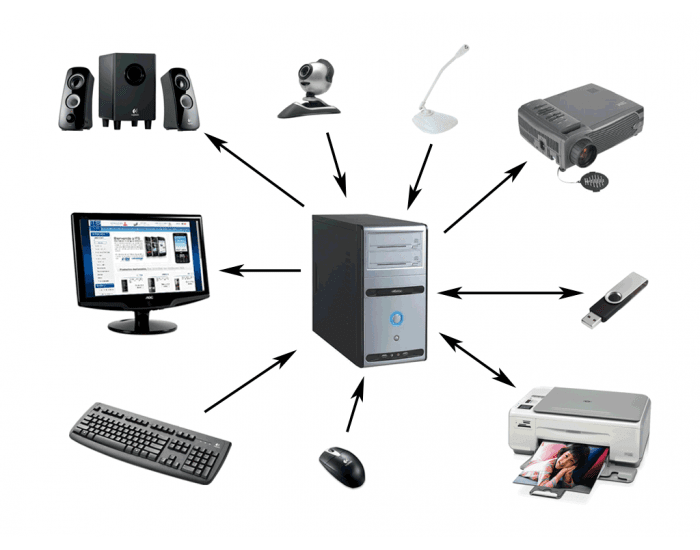
III. A. What is a personal computer? Read the text and do the exercise.
What is a personal computer?
A computer is an electronic machine can accept data in a certain form, process the data, and give the results of the processing in a specified format as information.
First, data is fed into the computer’s memory. Then, when the program is run, the computer performs a set of instructions and processes the data. Finally, we can see the results (the output) on the screen or in printed form.
A computer system consists of two parts: hardware and software. Hardware is any electronic or mechanical part you can see or touch. Software is a set of instructions, called a program, which tells the computer what to do. There are three basic hardware sections: the central processing unit (CPU), main memory and peripherals.
Perhaps the most influential component is the central processing unit. Its function is to execute program instructions and coordinate the activities of all the other units. In a way, it is the ‘brain’ of the computer. The main memory (a collection of Ram chips) holds the instructions and data which are being processed by the CPU. Peripherals are the physical units attached to the computer. They include storage devices and input /output devices.
Storage devices (hard drives, DVD drives or flash drivers) provide a permanent storage of both data and programs. Disk drives are used to read and write data on disks. Input devices enable data to go into the computer’s memory. The most common input devices are the mouse and the keyboard. Output devices enable us to extract the finished product from the system. For example, the computer shows the output on the monitor or prints the results onto paper by means of a printer.
On the rear panel of the computer there are several ports into which we can plug a wide range of peripherals – a modem, a digital camera, a scanner, etc. They allow communication between the computer and the devices. Modern desktop PCs have USB ports and memory card readers on the front panel.
B. Match these words from the text (1-9) with the correct meanings (a-i) and write the definitions.
|
1. software 2. peripherals 3. main memory 4. hard drive (hard disk) 5.hardware 6. input 7. ports 8. output 9. central processing unit (CPU) |
a. the brain of the computer b. physical parts that make up a computer system c. programs which can be used on a particular computer system d. the information which is presented to the computer e. results produced by a computer f. input devices attached to the CPU g. section that holds programs and data while they are executed processed h. magnetic device used to store information i. sockets into which an external device may be connected |
(Answers: 1-c 2-f 3-g 4-h 5-b 6-d 7-I 8-e 9-a)
IV. Listening. ‘Different types of computer’ By the book of InfoTech English for computer users S.R.Esteras Cambridge
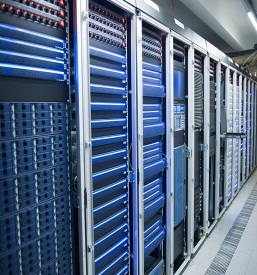
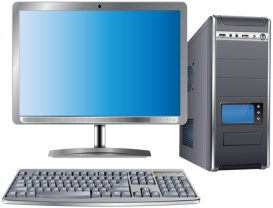
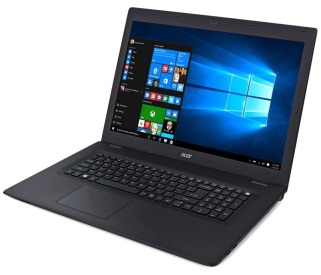
C. Now listen the extract about the different types of computer and label the pictures.
… as I’ll explain to you now computers can be divided into five main types, depending on their size and power. These are: mainframes, desktop PCs, laptops, tablet PCs and personal digital assistants, or PDAs.
Mainframes are the largest and most powerful computers. The basic configuration of a mainframe consists of a central system which processes immense amounts of data very quickly. This central system provides information and computing facilities for hundreds of terminals connected together in a network. Mainframes are used for large-scale computing purposes in banks, universities and big companies.
PCs, or personal computers, carry out their processing on a single microchip. They are usually classified by size and portability. A desktop PC is designed to be placed on your desk. It is used as a home computer or as a workstation for group work. Typical examples are the IBM PC and the Apple Macintosh.
A laptop is a portable computer that has a flat LCD screen and uses batteries for mobile use. Small laptops are also called notebooks. The latest models can run as fast as similar desktop computers and have similar configurations. They are ideal for business executives who travel a lot.
A tablet PC is a type of notebook computer that has an LCD screen on which you can write with a stylus or digital pen. Your handwriting is recognized and converted into editable text. You can also input text by using speech recognition or a small keyboard. You can fold and rotate the screen easily.
Finally, a PDA is a lightweight, handheld computer. The letters stand for a personal digital assistant. The term refers to a wide variety of handheld devices, including palmtops and pocket PCs. For input, you type using a small keyboard or you use a stylus – a special pen to select items on the screen. PDA can be used as mobile phones, personal organizers or media players. They also let you access the internet via WI-FI networks, and some include a GPS navigation system.
|
Label the pictures |
|
|
|
laptop desktop PC PDA mainframe tablet PC |
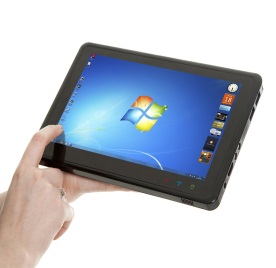
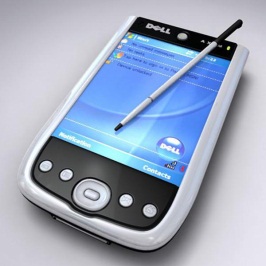
D. Listen again and decide whether these sentences are true or false.
|
False True True False False True True False |
V. Speaking.
Group work
T.: Many teenagers nowadays spend hours playing computer games. How many hours do you play computer games? Do computer games have more advantages or disadvantages?
Work in groups. One group tell about advantages. And the second group about disadvantages. Then each group tries to prove that they are right.
|
Advantages |
Disadvantages |
|
|
|
Students, let’s work with prepositions of place and directions.
-
There is a PC ______ the table. On
-
There is a printer ______ the computer. Near
-
The central unit is ________ the table. under
-
Personal computers are portable and work ____ built-in batteries. On
-
PC are designed for use ___ homes, schools and offices. At
-
Modern desktop PCs have USB ports and memory card readers____ the front panel. on
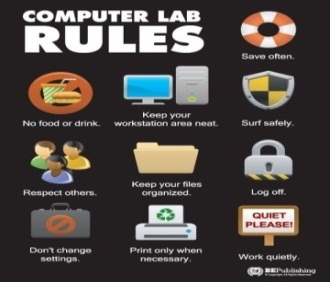
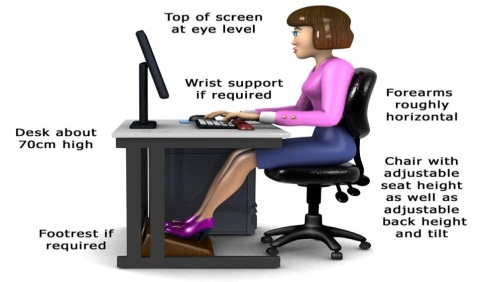
Main rules of working at the computer. Game ‘Make up a sentence’.
|
|
|
-
Sit on an adjustable chair because you can change its height and angle.
-
Put your feet flat on the floor or on a foot rest.
-
Sit upright, back straight, the distance between the eyes and monitor is 40-45 centimetres.
-
Keep your elbows at the same height of the keyboard.
-
Keep your arms parallel to the work surface.
-
Take regular breaks from the computer and look away from the screen at regular intervals.
-
Sit at arm’s length from the monitor.
-
Don’t eat food and don’t drink at the computer.
9. Keep your workplace neat.
VI. Reflection of the lesson: complete the sentences
|
Today at the lesson I…. |
Reviewed the material about |
Done
|
Remembered
|
Like
|
Dislike |
|
|
|
|
|
|
|
VII. Giving the home task: ex 187 page 149, vocabulary
VIII. Evaluation (Giving marks with comments)
Teacher: Turisbekova K.T.







 Бұл курс Қазақстан Республикасы Оқу-ағарту министрлігімен келісілген