|
Theme of the Lesson:
Air
|
School:261
|
|
Date:
|
Teacher
name: Ensepova
Bagila
|
|
Class:
|
Number present:
15
|
Absent:
0
|
|
Learning objectives that
through lesson is contributing
to
|
WordPad text
editor
|
|
Lesson
objectives
|
All learners will
be able to:
Know of the WordPad text editor
interface.
Most learners
will be able to:
Understanding the structure and
how to use it.
Some learners
will be able to:
When working with a computer,
the effective use of the features of the text editor
WordPad
|
|
Criteria
assessment
|
Learners achieve
the aim if:
They know the
WordPad text editor’s interface,
Understand the structure and
experiment
Use its possibility while working on the
computer
|
|
Language
objective
|
Learners
can Say thematic
lexis
|
|
Key words and
phrases: WordPad,
delete, backspace, document,
STANDARD Toolbar, cursor
|
|
Useful classroom
language for
dialogue/writing:
1.How to start the
WORDPAD program?
2. WordPad text editor windows
elements.
3. What can I create with
WordPad?
|
|
|
|
Values
|
Group work- collective,
responsibility for command work
result;
|
|
Connection with other
subjects
|
Science: previous lessons,
English
|
|
Previous
learning
|
Preparing for printing.
Print the picture.
|
|
The contents of the
lesson
|
|
Planned
timing
|
Planned activities (replace
the notes below with your planned
activities)
|
|
Start
(1
minute)
Organization
moment
|
Greeting, checking up
pupils` attendance, paying attention for their readiness for the
lesson, to get acquainted pupils with the theme and aims of the
lesson
|
|
2
minute
|
Teacher divides pupils into
2 groups. (monitor,
printer)
Pupils will tell how they
were divided into groups
|
|
4
minute
|
Teacher`s/ pupils`
activity
Question
-
How many types of erasers in
paint graphics?
-
What is a graphics
editor?
-
What are the errors of the
raster graphics?
-
How to create a
file?
-
How many colors are there in
paint graphics
editor?
Answer
-
2 types of
erasers немесе It is
two
-
Graphic editor - a program
that allows you to create, view, process and edit digital images on
your computer
-
When we large the
size, its quality will be
bad
-
The first way is to use the
context menu, move the pointer to the free area of the panel and
press the right mouse button. The second way to create is to use
the top menu of the
window.
-
There are 20 colors,
but we can add ten colors
too
|
|
Middle
(12minute)
|
Work use
text
І group.
Text
editor
ІІ
group. Text
structure
Group pupils read
the text and analyze it, decide one solution. One of the pupils
from the group explain it. Each group evaluate each
other.
|
|
Pair
work
3
minute
|
Find the names of
the parts of windows in the picture. After doing the task partners
evaluate each other
  1
2 1
2
 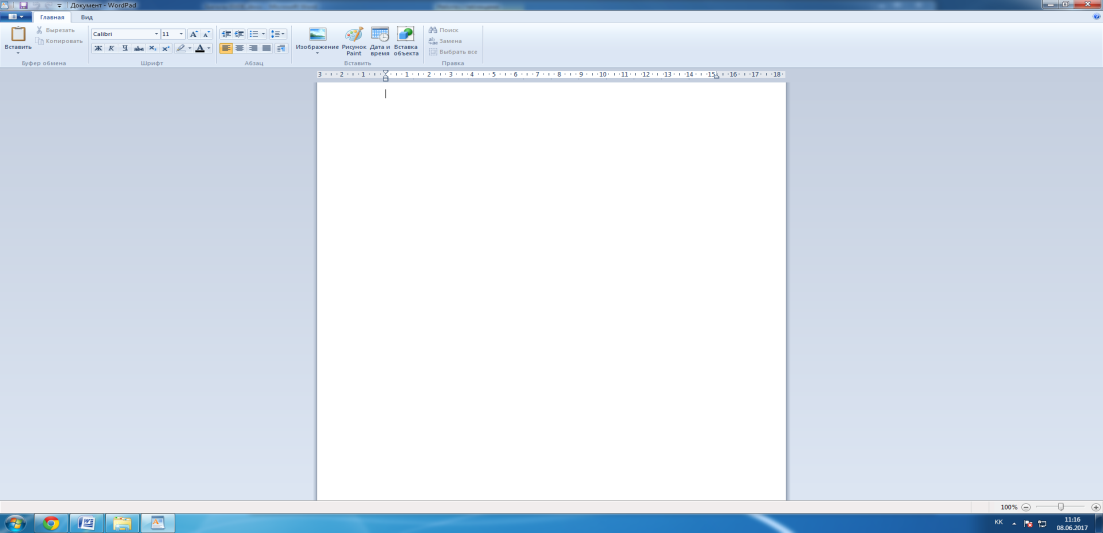

3
4
 5
5
|
|
Practice
17
minute
|
Individual
work:
Complete the text with correct from of the
words from the box and translation the word in to english after it
you must print one in to
computer
Дос, қыз күн әке үй
ана
1. Оқусыз білім жоқ, білімсіз ..... жоқ. (күн, day)
2. ....-
асқар тауың, ....-
шалқар көлің.(әке, father,
ана, mother
)
3. Гүл- жер көркі, ......
ел көркі. (қыз,
qirl)
4. Дұшпан күлдіріп айтады, ......
жылатып айтады. (дос- friend
)
5. Балалы..... –
базар. (үй-
house)
|
|
condusion
5
minute
|
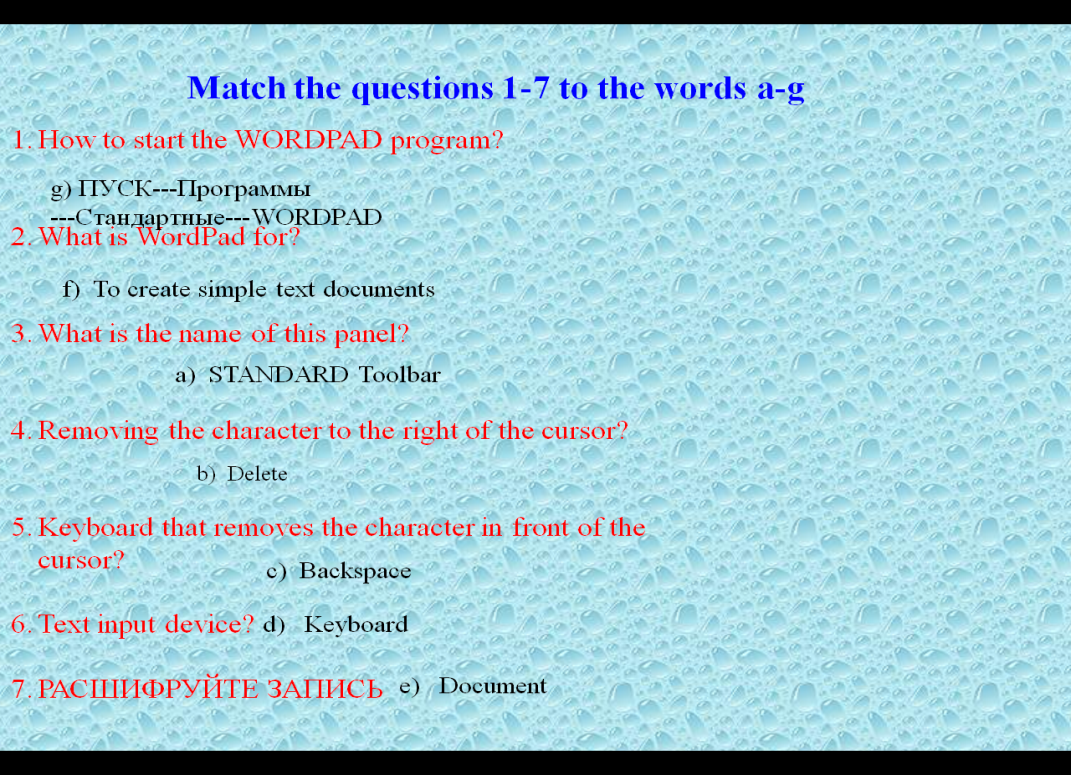
Match the questions
1-7
to the words
a-g
-
How to start the
WORDPAD program?
-
What is WordPad
for?
-
What is the name of
this panel? 
-
Removing the
character to the right of the
cursor?
-
Keyboard that
removes the character in front of the
cursor?
-
Text input
device?
-
Rearrange the
letters to make words (t o m u c n e d
)
-
ПУСК---Программы---Стандартные---WORDPAD
-
STANDARD
Toolbar
-
Backspace
-
Keyboard
-
Document
-
To create simple
text documents
-
Delete
|
|
End of the
lesson
reflection
Home assignment
:
|
-
I know …… from
this lesson.
§19
to read and answer the
given questions
|

 ЖИ көмекші


 Қауіпсіз төлем












 Бұл курс Қазақстан Республикасы Оқу-ағарту министрлігімен келісілген