ЖИ көмекші


0 / 1

Барлық 400 000 материалдарды тегін жүктеу үшін
Ұнаған тарифті таңдаңыз
Айлық
Жылдық
1 - күндік
Танысу 690 ₸ / 1 күнге
Таңдау
UstazTilegi AI - ЖИ арқылы тегін ҚМЖ, БЖБ, ТЖБ, тест, презентация, авторлық бағдарлама т.б. 10 материал жасау
Материалдар бөлімі - Барлық 400 000 материалдарды тегін 30 материал жүктеу
Аттестация ПББ тестеріне доступ аласыз шексіз
Жеке ҚМЖ бөлімінде - дайын ҚМЖ-ларды, презентацияларды жүктеу5 файлды тегін жүктеу
Олимпиада, турнир, байқауларға 50% жеңілдік
1 - айлық
Стандарт
2990 ₸ / айына
UstazTilegi AI - ЖИ арқылы тегін ҚМЖ, БЖБ, ТЖБ, тест, презентация, авторлық бағдарлама т.б. жасау 30 материал жасау
Материалдар бөлімі - Барлық 400 000 материалдарды тегін 900 материал жүктеу
Аттестация ПББ тестеріне доступ аласыз шексіз
Жеке ҚМЖ бөлімінде - дайын ҚМЖ-ларды, презентацияларды жүктеу 150 файлды тегін жүктеу
Жинақталған ҚМЖ бөлімінде 10 файлды тегін жүктеу
Олимпиада, турнир, байқауларға 50% жеңілдік
Іс-шаралар (мини-курстар, семинарлар, конференциялар) тегін қатысу
1 - айлық
Шебер 7990 ₸ / айына
Таңдау
UstazTilegi AI - ЖИ арқылы тегін ҚМЖ, БЖБ, ТЖБ, тест, презентация, авторлық бағдарлама т.б. жасау 150 материал жасау
Материалдар бөлімі - Барлық 400 000 материалдарды тегін 900 материал жүктеу
Аттестация ПББ тестеріне доступ аласыз шексіз
Жеке ҚМЖ бөлімінде - дайын ҚМЖ-ларды, презентацияларды жүктеу 300 файлды тегін жүктеу
Жинақталған ҚМЖ бөлімінде 50 файлды тегін жүктеу
Олимпиада, турнир, байқауларға 50% жеңілдік
Іс-шаралар (мини-курстар, семинарлар, конференциялар) тегін қатысу

Назар аударыңыз!
Сіз барлық мүмкіндікті қолдандыңыз.
Қалған материалдарды ертең жүктей аласыз.
Ок
Материалдың қысқаша нұсқасы
|
Long-Term Plan Section: |
Computer graphics |
school: |
|
Missing: |
|
|
Date: |
|
Name of teacher: |
Tokmaganbet A.U |
|
|
|
Grade: |
6 |
Participated |
|
||
|
Lesson topic |
Comparison of raster and vector images |
||||
|
Learning objectives to achieve in this lesson (link to the curriculum) |
6.2.2.3 evaluate the advantages and disadvantages of raster and vector graphics |
||||
|
The purpose of the lesson |
All students: - compare the volumes of raster graphics files; Most students - select the appropriate image editor depending on the purpose of creating the image; Some students: - identify the advantages and disadvantages of raster and vector graphics |
||||
|
Evaluation criteria |
- Compares the similarity and difference between raster and Vector;
- Distinguishes between advantages and disadvantages;
- Distinguishes between rastor and vector images. |
||||
|
Language target |
Vocabulary and terminology related to the discipline: Vector image-vector image - Vector image Raster image-raster image-Raster image |
||||
|
Prior knowledge |
Creating vector images |
||||
|
Scheduled time |
Actions to be taken according to plan |
Resources |
|||||||||||||||
|
The beginning of the lesson 4 min |
Greeting students. Mark present and absent. Opening a new topic
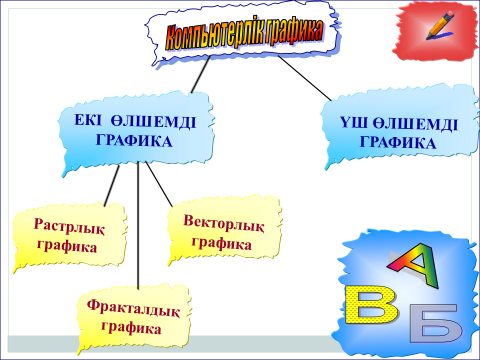
Deskriptor: looking at the picture, the topic of the new lesson is determined. Gets an idea from computer graphics; |
Book, interactive board |
|||||||||||||||
|
The middle of the lesson 25 min
|
I will explain the topic Computer graphics is an important branch of computer science that provides for obtaining various types of images (images, drawings, animations) using a computer. In rastor graphics, images consist of a set of colored dots.Representation of graphical information in the form of such a set of points or pixels is a representation in bitmap form. Each pixel that makes up a bitmap image has its own location and color, and each pixel needs one cell in computer memory. Rastor images have both advantages and disadvantages. Vector images are images that consist of a set of geometric objects, such as a line, arc, circle, and rectangle. Here, a vector is a set of data that describes these objects. The main advantage of vector graphics is that it can be easily reduced and enlarged, making changes without losing image quality. The next advantage is that the information volume of vector images is much smaller compared to bitmap images.
Tasks are evaluated using smilyes. At the end of the lesson are evaluated by the number of emoticons. A gift will be given to a student with a large number of emoticons Task 1 I'll put some pictures in the bag. One student from each group takes a picture of the bag and, in consultation with the group, tells what image it belongs to.
Discriptors - knows the rastor image; - knows the vector image; - knows the differences and disadvantages. Task 2 Сreate a photo collage in PowerPoint Descriptor: - Uses graphics images in PowerPoint, makes a collage Task 3 comparison of rastor graphics with vector graphics
|
Book
|
|||||||||||||||
|
End of lesson 5-7 |
Approval questions
point
line
СorelDRAW, Adobe illustrator and more
Adobe Photoshop, Corel PhotoPaint and more
Rastor graphics Students 'reflection at the end of the lesson: "Reflexive screen" Today I learned… It was interesting… It was difficult… I was doing assignments… Homework: reading the topic
|
|






 Жүктеу
ЖИ арқылы жасау
ЖИ арқылы жасау

Бөлісу
1 - айлық
Материал тарифі-96% жеңілдік
00
05
00
ҚМЖ
Ашық сабақ
Тәрбие сағаты
Презентация
БЖБ, ТЖБ тесттер
Көрнекіліктер
Балабақшаға арнарлған құжаттар
Мақала, Эссе
Дидактикалық ойындар
және тағы басқа 400 000 материал
Барлық 400 000 материалдарды шексіз
жүктеу мүмкіндігіне ие боласыз
жүктеу мүмкіндігіне ие боласыз
1 990 ₸ 49 000₸
1 айға қосылу
Материалға шағымдану
Бұл материал сайт қолданушысы жариялаған. Материалдың ішінде жазылған барлық ақпаратқа жауапкершілікті жариялаған қолданушы жауап береді. Ұстаз тілегі тек ақпаратты таратуға қолдау көрсетеді. Егер материал сіздің авторлық құқығыңызды бұзған болса немесе басқа да себептермен сайттан өшіру керек деп ойласаңыз осында жазыңыз
Жариялаған:
Токмаганбет Арайлым Утегеновна 10 Қараша 2021
 388
388Шағым жылдам қаралу үшін барынша толық ақпарат жіберіңіз
Қысқа мерзімді жоспар
Тақырып бойынша 11 материал табылды
Қысқа мерзімді жоспар
Материал туралы қысқаша түсінік
Comparison of raster and vector images
Learning objectives to achieve in this lesson (link to the curriculum) 6.2.2.3 evaluate the advantages and disadvantages of raster and vector graphics
Материалдың қысқаша нұсқасы
|
Long-Term Plan Section: |
Computer graphics |
school: |
|
Missing: |
|
|
Date: |
|
Name of teacher: |
Tokmaganbet A.U |
|
|
|
Grade: |
6 |
Participated |
|
||
|
Lesson topic |
Comparison of raster and vector images |
||||
|
Learning objectives to achieve in this lesson (link to the curriculum) |
6.2.2.3 evaluate the advantages and disadvantages of raster and vector graphics |
||||
|
The purpose of the lesson |
All students: - compare the volumes of raster graphics files; Most students - select the appropriate image editor depending on the purpose of creating the image; Some students: - identify the advantages and disadvantages of raster and vector graphics |
||||
|
Evaluation criteria |
- Compares the similarity and difference between raster and Vector;
- Distinguishes between advantages and disadvantages;
- Distinguishes between rastor and vector images. |
||||
|
Language target |
Vocabulary and terminology related to the discipline: Vector image-vector image - Vector image Raster image-raster image-Raster image |
||||
|
Prior knowledge |
Creating vector images |
||||
|
Scheduled time |
Actions to be taken according to plan |
Resources |
|||||||||||||||
|
The beginning of the lesson 4 min |
Greeting students. Mark present and absent. Opening a new topic
Deskriptor: looking at the picture, the topic of the new lesson is determined. Gets an idea from computer graphics; |
Book, interactive board |
|||||||||||||||
|
The middle of the lesson 25 min
|
I will explain the topic Computer graphics is an important branch of computer science that provides for obtaining various types of images (images, drawings, animations) using a computer. In rastor graphics, images consist of a set of colored dots.Representation of graphical information in the form of such a set of points or pixels is a representation in bitmap form. Each pixel that makes up a bitmap image has its own location and color, and each pixel needs one cell in computer memory. Rastor images have both advantages and disadvantages. Vector images are images that consist of a set of geometric objects, such as a line, arc, circle, and rectangle. Here, a vector is a set of data that describes these objects. The main advantage of vector graphics is that it can be easily reduced and enlarged, making changes without losing image quality. The next advantage is that the information volume of vector images is much smaller compared to bitmap images.
Tasks are evaluated using smilyes. At the end of the lesson are evaluated by the number of emoticons. A gift will be given to a student with a large number of emoticons Task 1 I'll put some pictures in the bag. One student from each group takes a picture of the bag and, in consultation with the group, tells what image it belongs to.
Discriptors - knows the rastor image; - knows the vector image; - knows the differences and disadvantages. Task 2 Сreate a photo collage in PowerPoint Descriptor: - Uses graphics images in PowerPoint, makes a collage Task 3 comparison of rastor graphics with vector graphics
|
Book
|
|||||||||||||||
|
End of lesson 5-7 |
Approval questions
point
line
СorelDRAW, Adobe illustrator and more
Adobe Photoshop, Corel PhotoPaint and more
Rastor graphics Students 'reflection at the end of the lesson: "Reflexive screen" Today I learned… It was interesting… It was difficult… I was doing assignments… Homework: reading the topic
|
|
 Жүктеу
 Бөлісу
ЖИ арқылы жасау
Файл форматы:

docx

10.11.2021

388
Жүктеу
ЖИ арқылы жасау
Жариялаған:
Бұл материалды қолданушы жариялаған. Ustaz Tilegi ақпаратты жеткізуші ғана болып табылады. Жарияланған материалдың мазмұны мен авторлық құқық толықтай автордың жауапкершілігінде. Егер материал авторлық құқықты бұзады немесе сайттан алынуы тиіс деп есептесеңіз,
шағым қалдыра аласыз
шағым қалдыра аласыз