
 ЖИ көмекші



|
Class |
7A, 7B, 7C |
Date |
Week 10 |
|
|
Lesson |
Computer |
|||
|
Period |
45 minutes |
|||
|
Subject |
Scratch Blocks, Script, Sprite, Costume, Stage |
|||
|
Aim |
To teach programming |
|||
|
Materials |
Slideshow. Projector. |
|||
|
Methods and Techniques |
Lecture, demonstration. practice |
|||
|
|
||||
|
General Review of Previous Lesson : |
||||
|
|
||||
|
Outline : |
|
|||
|
B Blocks are the colored pieces that we move around to make Scratch programs. Different colored blocks are used to do different things. The block color is the same color that goes with the block tab where you find that block. Script: A script is a group of connected blocks that does something when you double click on it Sprite: A sprite is a Scratch character. Each sprite has its own scripts, costumes, and sounds. Sprites are shown on the stage and in the sprites area in the bottom left part of the screen. Costume: The appearance of the sprite on the stage. Each sprite can have multiple costumes. Stage: The stage is in the upper left part of the Scratch editor. This is where you can see what happens when you run your scripts. |
||||
|
Interrogation of new subject: |
|
|||
|
Computer Science Lingo |
||||
|
Homework: |
|
|||
|
Scratch Blocks |
||||
|
Evaluation: |
Ask questions and give marks |
|||
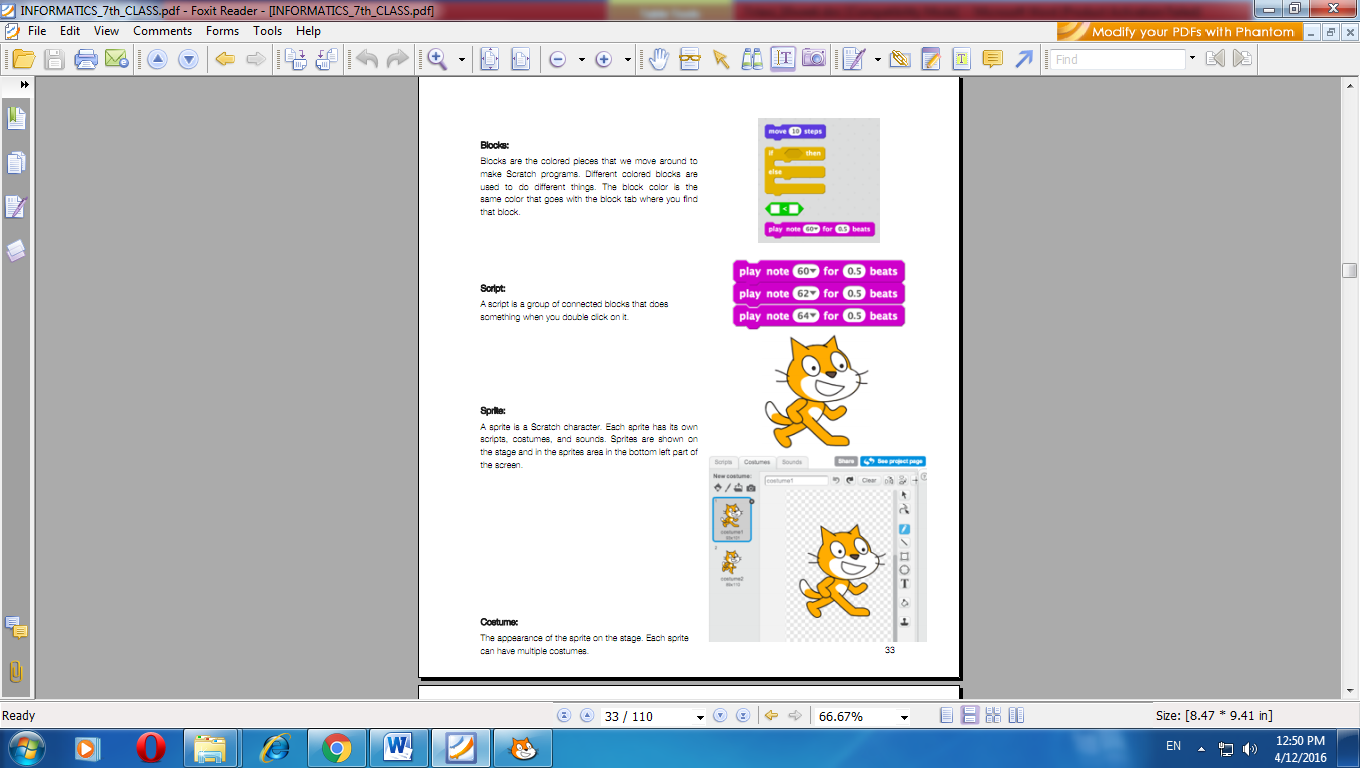 locks:
Teacher Vice Principal
 Жүктеу
жүктеу мүмкіндігіне ие боласыз
Бұл материал сайт қолданушысы жариялаған. Материалдың ішінде жазылған барлық ақпаратқа жауапкершілікті жариялаған қолданушы жауап береді. Ұстаз тілегі тек ақпаратты таратуға қолдау көрсетеді. Егер материал сіздің авторлық құқығыңызды бұзған болса немесе басқа да себептермен сайттан өшіру керек деп ойласаңыз осында жазыңыз
 21 Желтоқсан 2017
 581
581Scratch Blocks, Script, Sprite, Costume, Stage
|
Class |
7A, 7B, 7C |
Date |
Week 10 |
|
|
Lesson |
Computer |
|||
|
Period |
45 minutes |
|||
|
Subject |
Scratch Blocks, Script, Sprite, Costume, Stage |
|||
|
Aim |
To teach programming |
|||
|
Materials |
Slideshow. Projector. |
|||
|
Methods and Techniques |
Lecture, demonstration. practice |
|||
|
|
||||
|
General Review of Previous Lesson : |
||||
|
|
||||
|
Outline : |
|
|||
|
B Blocks are the colored pieces that we move around to make Scratch programs. Different colored blocks are used to do different things. The block color is the same color that goes with the block tab where you find that block. Script: A script is a group of connected blocks that does something when you double click on it Sprite: A sprite is a Scratch character. Each sprite has its own scripts, costumes, and sounds. Sprites are shown on the stage and in the sprites area in the bottom left part of the screen. Costume: The appearance of the sprite on the stage. Each sprite can have multiple costumes. Stage: The stage is in the upper left part of the Scratch editor. This is where you can see what happens when you run your scripts. |
||||
|
Interrogation of new subject: |
|
|||
|
Computer Science Lingo |
||||
|
Homework: |
|
|||
|
Scratch Blocks |
||||
|
Evaluation: |
Ask questions and give marks |
|||
Teacher Vice Principal
 Жүктеу

 Жүктеу
шағым қалдыра аласыз


 Бұл курс Қазақстан Республикасы Оқу-ағарту министрлігімен келісілген


